Contact Us

If you still have questions or prefer to get help directly from an agent, please submit a request.
We’ll get back to you as soon as possible.

Please fill out the contact form below and we will reply as soon as possible.

    • Home
    • Padroneggiare la Piattaforma
    • Directory
    • Directory Generale
    • Google

    Ubicazioni chiuse temporaneamente in Google Business Profile (GBP)

    Contact Us

    If you still have questions or prefer to get help directly from an agent, please submit a request.
    We’ll get back to you as soon as possible.

    Please fill out the contact form below and we will reply as soon as possible.

    Italian
    FR French
    IT Italian
    JP Japanese
    DE German
    US English (US)
    ES Spanish
    • Padroneggiare la Piattaforma
      Vicino a me 360 IA Analitiche Directory Homepage Hub Ubicazione Localizzatore + Pagine Messaggi App Mobile Stato della Piattaforma e Domande Frequenti Gestione delle Recensioni Sociale La Dashboard Novità
    + More

    Nel corso della crisi da coronavirus, Google ha introdotto un nuovo stato per le attività commerciali, che attualmente può essere assegnato solo direttamente in Google My Business (GMB).

    Per implementare questa modifica per una o più tue attività, accedi a https://business.google.com.

    1. Seleziona l'attività che desideri aggiornare.
    2. Quindi, sulla sinistra, seleziona la scheda „Info".
    3. Scorri un po' verso il basso nella finestra principale fino a quando non appare il titolo della sezione „Chiudi attività su Google".
    4. Al di sotto sono disponibili 3 opzioni. Seleziona: „Contrassegna come temporaneamente chiuso"
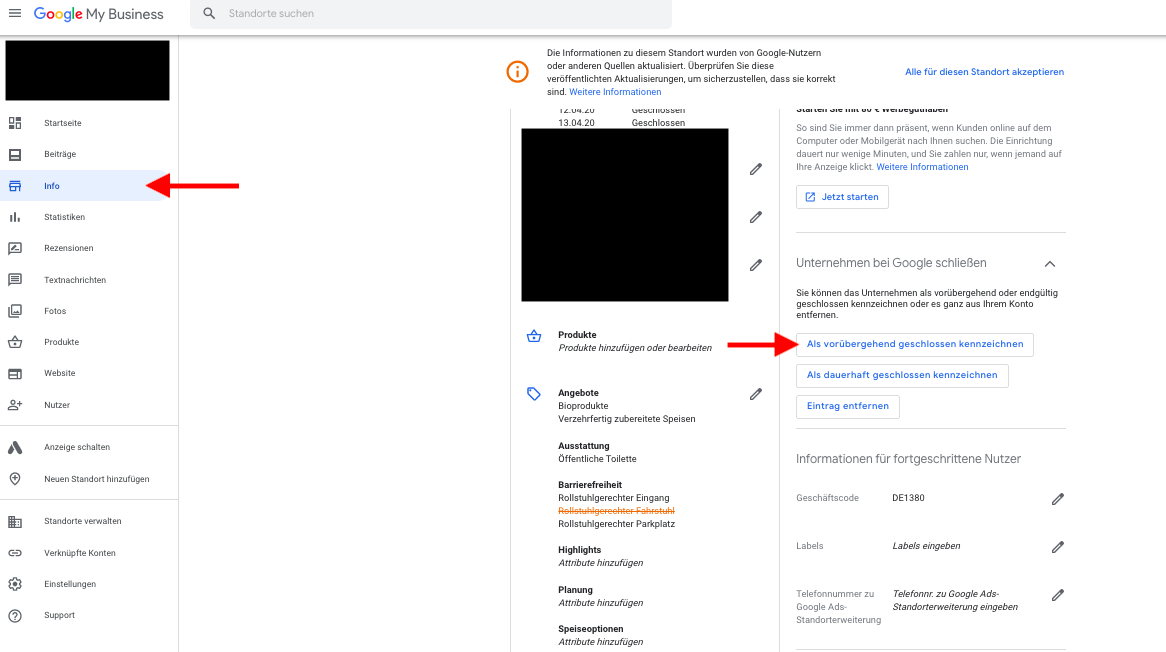
     

    Un'immagine che contiene screenshot.

Descrizione generata automaticamente


    Was this article helpful?

    Yes
    No
    Give feedback about this article

    Related Articles

    • Come posso aggiornare l'indirizzo della mia attività nelle mie schede Google e Google Maps?
    • Google: Perché le mie attività vengono visualizzate solo quando eseguo lo zoom in su Google Maps?

    Copyright 2026 – uberall.

    Expand