Páginas de Facebook sin reclamar
Aprende a reconocer y comenzar a gestionar perfiles de Facebook sin reclamar
Una página puede existir para tu negocio incluso si nadie la gestiona. En este caso, hablamos de una página no reclamada. Por ejemplo, cuando alguien se registra en un lugar que no tiene una página oficial, se crea una página no gestionada para representar la ubicación. Una página también puede generarse a partir de un artículo de Wikipedia.
¿Cómo puedo reconocer una página no reclamada?
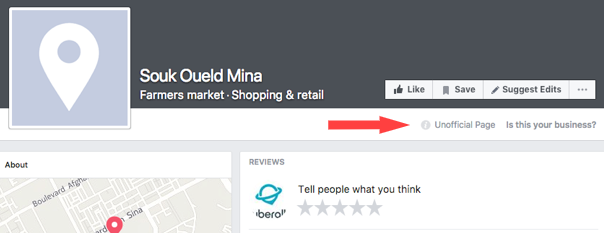
Si la página no está gestionada, verás Página no oficial debajo de su foto de portada. Puedes solicitar reclamar la página y convertirte en su administrador o puedes fusionar la página fusionar la página con una página que ya gestiones para tu negocio.
Find out here some tips on handling duplicate or unmanaged Facebook (FB) pages:
Merging Facebook pages
If you have duplicate Facebook location (brand) pages, it will not be possible to merge them.
However, you can unpublish or delete one of these pages - as long as you are the Admin of both pages on Facebook.
In case you have two Business pages on FB, you are able to request to merge them by following these instructions. Please keep in mind that it is not guaranteed that Facebook will agree and take action on the merge.
In some cases, verifying your own page first before reporting the duplicate and request the merge has proven successful (please check below how to do so).
*If you would like to clarify the main differences between the two types of FB pages mentioned above, please read this article.
Verifying Facebook pages
Facebook offers the verification option to indicate to users that a certain FB page or profile is authentic.
A verification status is indicated by a blue checkmark next to the page or profile name.
You can start the verification process by following the steps described here.
Removing a Facebook page that is managed by somebody not associated with your business
It is not simple to get access to a Facebook page that is being managed by somebody else.
We recommend that you first try to contact the current Facebook page owner and kindly ask them to hand over the page to you. It might help to inform them that if you report the trademark or copyright infringement to FB, the current page owner might be fined by Facebook.
If this proves unsuccessful and the page in question is indeed infringing on your trademark or copyright, you can report this to Facebook here. This process will take at least 3 weeks and will require you to provide ownership proof - such as bills, rental contracts, etc. - to FB via a document upload during the process.
Removing a Facebook page that is not managed by anybody (unmanaged/unowned)
Any Facebook page of a business that is unmanaged will show as an 'Unofficial Page' below their cover photo (you might need to log out from your Facebook account in order to see it correctly).
It is possible to claim these pages via Facebook directly.
As soon as you have accomplished this, you automatically become the Admin of that page.
Therefore, if you want this page to be removed, you have now a few options:
- unpublish your FB page: the page will be immediately invisible to everybody except users who manage it;
- delete your FB page: the page will remain online for another 14 days. If you want the page to be invisible to everyone during this time, you must also unpublish your Facebook page.
- try to merge your FB page with another one of your pages: this option is only available if both pages are stand-alone business pages with the same address, represent the same thing and you are the Admin of both. Please note that it is Facebook that decides on the merge request.