Contact Us

If you still have questions or prefer to get help directly from an agent, please submit a request.
We’ll get back to you as soon as possible.

Please fill out the contact form below and we will reply as soon as possible.

    Sign In
    • Home
    • Verzeichnisse
    • Google

    Wie kann ich Standorte in Google My Business (GMB) öffnen und schließen?

    Contact Us

    If you still have questions or prefer to get help directly from an agent, please submit a request.
    We’ll get back to you as soon as possible.

    Please fill out the contact form below and we will reply as soon as possible.

    German
    FR French
    IT Italian
    JP Japanese
    DE German
    US English (US)
    ES Spanish
    • Meistern der Plattform
      Locator + Pages Plattform Anleitungen API Best Practices In meiner Nähe 360 KI Analytik Startseite Standort-Hub Locator + Seiten Nachrichten Mobile-App Plattformstatus und allgemeine FAQs Bewertungsverwaltung Sozial Das Dashboard Neuerungen
    • Verzeichnisse
      Google Facebook Verzeichnisse Allgemein Verzeichnisliste
    • Release Notes
    + More

    In den meisten Fällen können Standorte direkt über unsere Plattform geschlossen werden. In Ausnahmefällen z.B. wenn Google während der Corona-Ausnahmesituation automatisch Standorte schließt, wird es notwendig, den Status einiger Standorte direkt in Google My Business (GMB) anzupassen.


    Standorte in Google schließen und öffnen

    Um einen Standort direkt in GMB zu öffnen oder zu schließen, melden dich bitte auf https://business.google.com an.

    1. Wenn auf der linken Seite „Standorte verwalten" ausgewählt ist, siehst du mittig im Fenster ein Dropdown-Menü, in welchem du die Standortgruppe auswählen kannst.
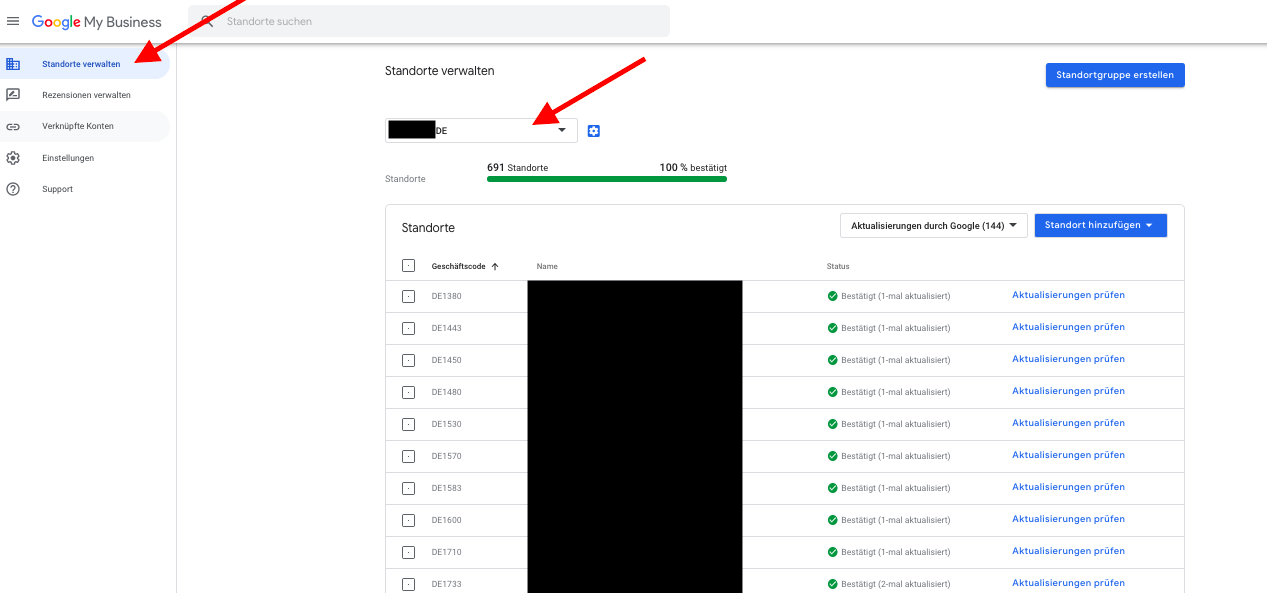
    2. Ein Bild, das Screenshot enthält.

Automatisch generierte Beschreibung
    3. Als nächstes wählst du bitte die Standorte aus, welche du öffnen möchtest, indem du das entsprechende Kästchen vor dem Google-Geschäftscode per Klick auswählst.
    4. Auf der rechten Seite erscheint dann ein Button für wählbare Aktionen als Dropdown-Menü.
    5. Wähle dort aus, ob du Standorte öffnen oder dauerhaft schließen möchtest und bestätige deine Auswahl.


    Um Standorte nur temporär zu schließen, lies bitte den Artikel zur temporären Schließung von Standorten.

    Was this article helpful?

    Yes
    No
    Give feedback about this article

    Related Articles

    • Wie kann ich mich bei Google My Business anmelden?
    • Wie kann ich eine Standortgruppe in Google My Business (Unternehmensaccount) erstellen?
    • Wie kann ich mehrere Standorte in Google My Business hochladen?
    • Welche Vorteile bietet es, meinen Google-Account mit der Plattform zu verbinden?
    • Wie kann ich eine Google My Business-Standortgruppe (Unternehmenskonto) mit der Plattform verbinden?
     

    Copyright 2026 – uberall.

    Expand