Contact Us

If you still have questions or prefer to get help directly from an agent, please submit a request.
We’ll get back to you as soon as possible.

Please fill out the contact form below and we will reply as soon as possible.

    Sign In
    • Home
    • Using Uberall / Uberallの使用
    • Locator + Pages / ロケーター+ページ

    CSS によるロケーター+ページのカスタマイズ

    CSS を使用して実現できるカスタマイズをまとめています

    Contact Us

    If you still have questions or prefer to get help directly from an agent, please submit a request.
    We’ll get back to you as soon as possible.

    Please fill out the contact form below and we will reply as soon as possible.

    Japanese
    FR French
    IT Italian
    JP Japanese
    DE German
    US English (US)
    ES Spanish
    • Getting Started / はじめに
      Configuration and Connection Guides / 設定と接続ガイド New here / 初めての方
    • Uberall Academy and Learning Resources / Uberall アカデミーと学習リソース
      Learning Resources - Best Practices / 学習リソース - ベストプラクティス Uberall Academy / Uberall アカデミー
    • Using Uberall / Uberallの使用
      Mobile App / モバイルアプリ Review Management / レビュー管理 Social / ソーシャル Platform Status and General FAQs / プラットフォーム状況とよくある質問 Locator + Pages / ロケーター+ページ Messages / メッセージ What's New / 新着情報 AI / AI Homepage / ホームページ The Dashboard / ダッシュボード Location Hub / ロケーションハブ Analytics / アナリティクス Directories / ディレクトリ
    • Org Settings / 組織設定
      Users / ユーザー API Keys / APIキー Webhooks / ウェブフック Billing / 請求
    • Connecting Tools / 接続ツール
      API
    + More

    Table of Contents

    情報 ウィジェットに CSS コードを追加する フォントの変更 ピンとして使用するロゴの白い背景を削除する テキストの配置 マップの幅と高さを変更する(例) L&P で利用可能な最大幅を使用する コンテンツリストをテキストボックスとして使用する

    カスタマイズの一部は、ロケーター+ページ製品では標準機能として提供されていません。この記事では、CSS スタイルを使用してそれらを実現する方法を説明します。

    製品の進化に伴い、以下のカスタマイズの一部は、ウィジェット属性でカスタマイズ可能な正式機能になる場合があります。その場合、CSS の代わりに、ウィジェットでのカスタマイズ方法を説明する記事へのリンクに置き換えられます。
    情報

    以下の例は、現在お使いの CSS と競合する可能性がありますのでご注意ください。これらはあくまで例であり、お客様のウェブサイトの HTML で動作させるには調整が必要な場合があります。


    Uberall は、ロケーターへの CSS 調整が今後のロケーターのアップデートでもサポートされることを保証するものではありません!


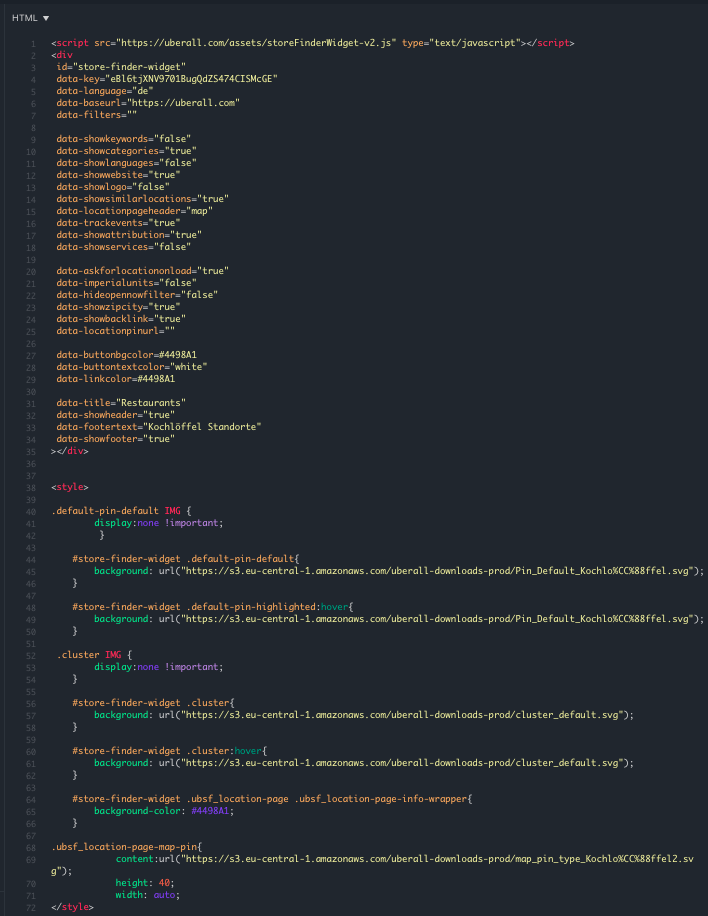
    ウィジェットに CSS コードを追加する

    CSS スタイルは、こちらのように、ウィジェットの後に HTML コードとして追加する必要があります:


    フォントの変更

    例

    #store-finder-widget * {
    font-family: 'Times New Roman', Times, serif !important;
    color: red !important;
    }

    ピンとして使用するロゴの白い背景を削除する

    #store-finder-widget .ubsf_custom-pin-default{
       background: none
       }
    
    
     #store-finder-widget .ubsf_custom-pin-highlighted{
       background: none
       }

    テキストの配置

    例:

    yourElementHere {
      text-align: center;
    }
    
    yourElementHere {
      text-align: left;
    }
    
    yourElementHere {
      text-align: right;
    }
    
    yourElementHere {
      text-align: justify;
    }

    最終結果:

    #store-finder-widget .ubsf_location-page .ubsf_location-page-info-wrapper .custom-content-lis {
        text-align: left; }
    Delete


    マップの幅と高さを変更する(例)

    class="article-insert-fragment inser-answer-1313060">By default, the Locator & Pages widget uses a set maximum width on the page i...


    By default, the Locator & Pages widget uses a set maximum width on the page it's implemented on. To make the the Locator use 100% of the width available to it from its enclosing container, add the following data-attribute to the widget: data-showfullwidth="true"


    #store-finder-widget .ubsf_store-finder-column {
    
        height: 700px;
    }

    コンテンツリストをテキストボックスとして使用する

    ロケーターに「説明」のようなセクションをもう 1 つ追加したい場合は、People コンテンツリストまたはカスタムコンテンツリストを転用できます。以下の CSS を使用するには、対象のコンテンツリストのアイテムが 1 件以下である必要があります。

    カスタムコンテンツリストの CSS

    <style>
        .ubsf_content-list-item.ubsf_customitems-list-item.ubsf_has-photo, .ubsf_content-list-item.ubsf_customitems-list-item{width:unset !important; flex:auto !important;}
        .ubsf_content-list-item.ubsf_customitems-list-item.ubsf_has-photo > .description.ubsf_content-list-item-description, .ubsf_content-list-item.ubsf_customitems-list-item > .description.ubsf_content-list-item-description{max-height: unset !important;}
    </style>

    People コンテンツリストの CSS

    <style>
        .ubsf_content-list-item.ubsf_person-item.ubsf_has-photo > .description.ubsf_content-list-item-description, .ubsf_content-list-item.ubsf_person-item > .description.ubsf_content-list-item-description{max-height: unset !important;}
    </style>
    Delete


    カスタマイズ スタイル

    Was this article helpful?

    Yes
    No
    Give feedback about this article

    Related Articles

    • 場所の名前はどのように構成すればよいですか?
    • セルフサービス ロケーター&ページに関するよくある質問
    • 埋め込み型ロケーター+ページ(セルフサービス)とは?
    • ロケーター&ページのフィルター
    • ロケーター+ページのコンポーネント
     

    Copyright 2026 – uberall.

    Expand